Starting from Visual Studio 2013 onwards, certain functions such as scanf, getch have been deprecated. These functions may be unsafe or obsolete, and Microsoft replaced them with safer alternatives like _getch, scanf_s, printf_s. Below is a comprehensive guide to fixing Error C4996.
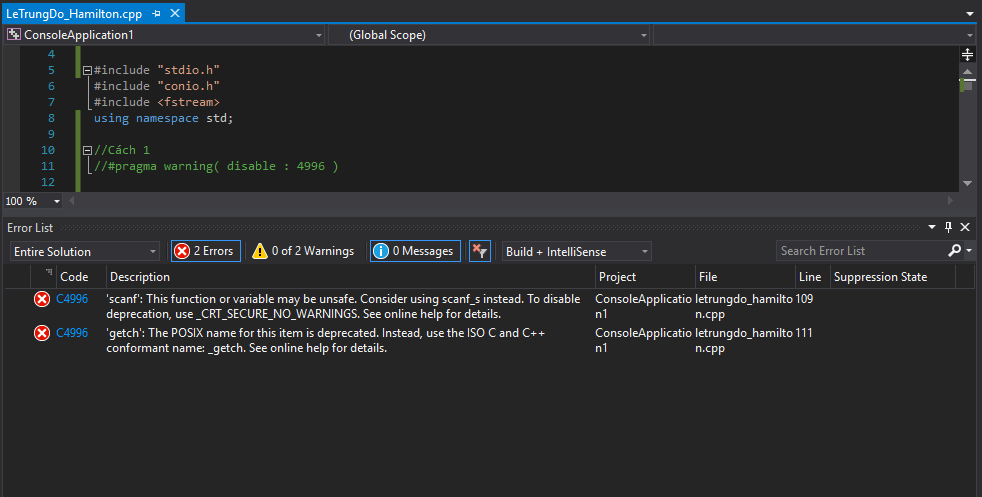
Error C4996 'getch': The POSIX name for this item is deprecated. Instead, use the ISO C and C++ conformant name: _getch. See online help for details.Error C4996 'scanf': This function or variable may be unsafe. Consider using scanf_s instead. To disable deprecation, use _CRT_SECURE_NO_WARNINGS. See online help for details.Difference Between _getch and getch, scanf_s and scanf
There is no functional difference between these functions. In fact, they are often just two different names for the exact same underlying functionality.
How to Disable C4996 Warning / Error
There are several ways to disable Error C4996:
Method 1: Using #pragma
Add the following line right before your main function:
#pragma warning( disable : 4996 )Method 2: Using #define
Add these 2 lines at the very top line of your code file. If placed after header #include statements, it will have no effect.
#define _CRT_NONSTDC_NO_WARNINGS
#define _CRT_SECURE_NO_WARNINGS
Method 3: Using Preprocessor Definitions
This method is structurally similar to Method 2, but configured via IDE project properties.
Right-click on your project name and select Properties (Alt+Enter).
Under Configuration Properties, select C/C++ -> Preprocessor -> Preprocessor Definitions.
Add _CRT_NONSTDC_NO_WARNINGS; _CRT_SECURE_NO_WARNINGS as shown below and click OK.
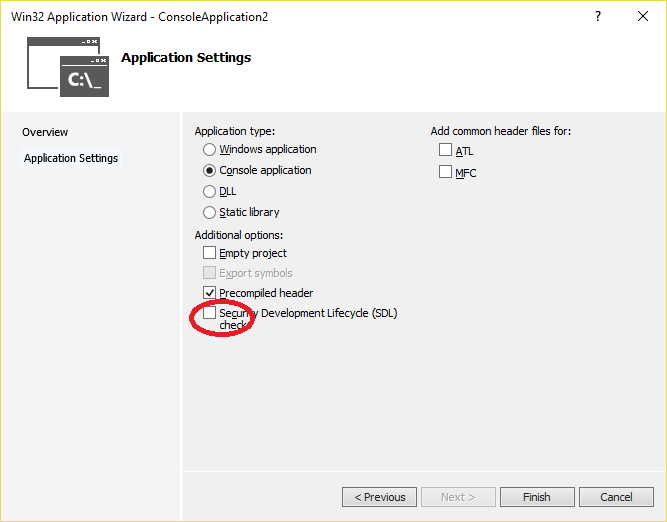
Method 4: Disable SDL Checks When Creating a Project
When creating a new project, uncheck "Security Development Lifecycle (SDL) checks". This prevents C4996 warnings from being thrown as errors.
Reference: msdn.microsoft.com/query/dev14.query?appId=Dev14IDEF1&l=EN-US&k=k(C4996)&rd=true