 Cannot open or read .chm files? You downloaded an ebook or documentation file in .chm format, but opening it shows table of contents while main content pane remains blank.
Before diving into solutions, here is an overview of the CHM format:
- CHM stands for Compiled HTML Help, a proprietary format introduced by Microsoft for application help documentation.
- CHM bundles HTML pages, index tables, and search indices into a single file compressed via LZX compression algorithm.
1. Blank Content Pane in .chm Files
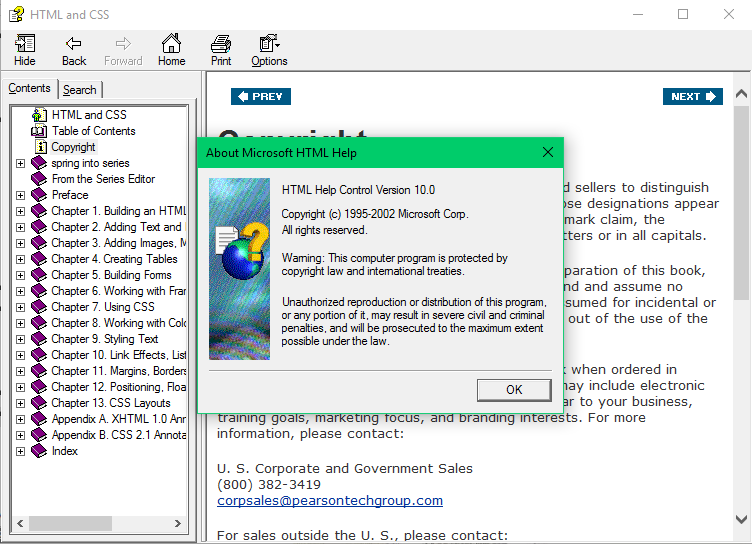
Cause: Security blocking rules introduced by Windows (specifically starting from hotfix KB896358). Because CHM files can contain active HTML/scripts linking to remote network resources, Windows flags downloaded CHM files from external sources as untrusted by default.
Two Methods to Fix This Issue:
Method 1: Uncheck "Always ask before opening this file" in the security prompt popup upon launching the CHM file.
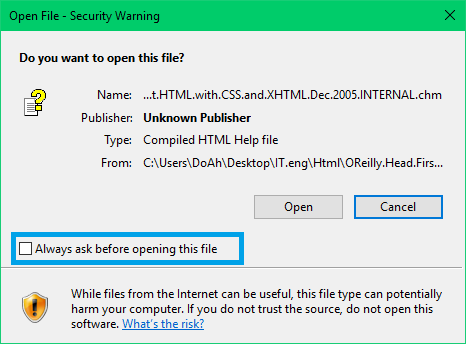
Then click Open.
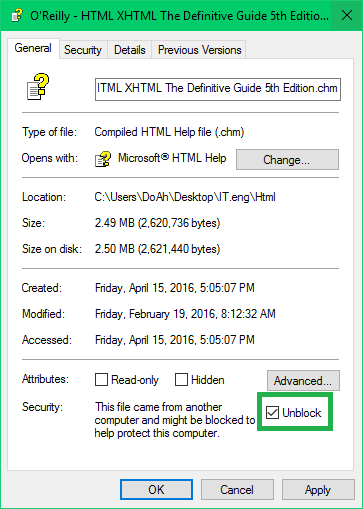
Method 2: Right-click the `.chm` file, select **Properties**, click **Unblock** at the bottom of General tab, then click **OK**.
2. Other Common Errors:
Corrupted or Missing `hh.exe` System Handler
The default HTML Help executable (`hh.exe`) is corrupted or removed by antivirus software.
- Method 1: Copy `hh.exe` from another working PC running the same Windows version into `C:\Windows\`.
- Method 2: Run Command Prompt as Administrator (`cmd.exe`) and execute system file checker: `sfc /scannow`. Restart PC upon completion.
-
Method 3: In Command Prompt (Admin), register DLL components:
`regsvr32 %systemroot%\system32\hhctrl.ocx`
`regsvr32 %systemroot%\system32\itss.dll`
Corrupted `hhctrl.ocx` Library
`hhctrl.ocx` in System32 directory is corrupted or overwritten. Replace `hhctrl.ocx` in `C:\Windows\System32\` from a working PC of same OS build, then run `regsvr32 c:\windows\system32\hhctrl.ocx` in Run/CMD.
CHM Files with Vietnamese Unicode Characters in Filename/Path
Ensure System Locale is configured properly in Control Panel -> Region & Language options. Alternatively, rename the CHM file and folder paths to non-accented ASCII characters.
Third-Party Readers
You can also use open-source third-party document readers that render CHM files natively:
Sumatra PDF supports CHM, PDF, ePub, MOBI, XPS, DjVu, CBR, CBZ.
xCHM is a lightweight cross-platform CHM reader for Windows, Mac, and Linux.
FBReader e-book reader with CHM support.