This is a universal ROM flashing guide for all SKY Pantech models from A600 to A920. Installing official stock SKY ROM safely resolves bootloop issues quickly. If your phone gets stuck on logo or encounters system errors, follow these steps.
While multiple flashing tools exist, offline flashing using PDL is the most reliable method.
Guide to Installing Official Stock SKY ROM via PDL
Step 1: Download Required Files for Flashing Process
Visit kimcloud.kr/pantech/_binx/ to download the matching Stock ROM version for your device model. Each model usually has 3 variants (K, L, S); verify your exact variant before downloading.
Next, convert the .BINX file to a .PDL file using these tools:
Download: BINX2PDL or tool-convert-binx-pdl-1.3
Download and install USB Drivers so PC recognizes the phone: Download Drivers
Download PDL_OS to flash the .PDL ROM file to your phone: Download PDL_OS
Step 2: Flash the ROM
Boot the phone into S/W Upgrading mode by powering off device, then holding key combinations:
- A770, 760, 810, 800, 820: Power | Volume+ | Search
- A830 and newer: Power | Volume+ | Volume-
Connect the phone to PC via USB cable.
Open downloaded PDL_OS (internet connection required on PC for tool initialization). Interface looks like this:
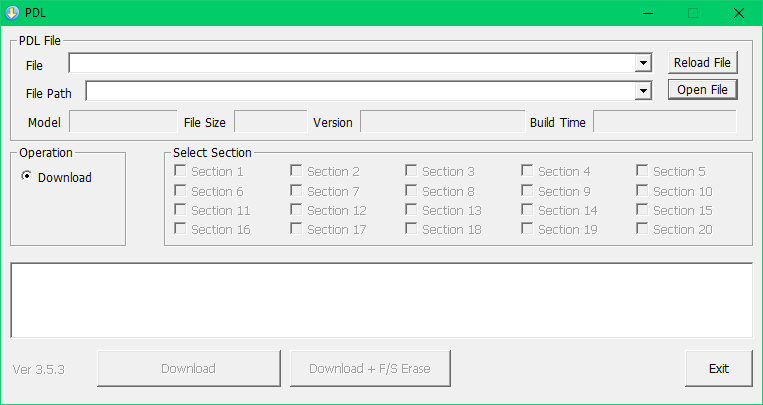
Click Open File and select your converted .PDL file.
If prompted for a model code/password, download this file to find the code corresponding to your device model.
- Choose Download if you want to keep internal data intact.
- Choose Download + F/S Erase if you want a clean wipe installation.
Flashing takes approximately 5 minutes. You can upgrade or downgrade system versions safely without risking bootloops.