When ISPs block Facebook at network level, simply changing DNS to Google DNS or OpenDNS may not restore access. Here are several methods to access Facebook easily.
How to Access Facebook When Blocked?
1. Download Coc Coc or Tor Browser
+ Coc Coc: Built on Chromium with built-in unblocking features for local networks in Vietnam. Download and install to access Facebook directly without extra setup. Certified safe by Norton Security.
+ Tor Browser: High security browser built on onion routing network. Bypasses blocks and maintains online anonymity. Download Tor at: https://www.torproject.org.
Note: Tor routing can slow down loading speeds and clears cookies upon closing.
2. Use Unlimited Free VPN - Hola
For Chrome users: Install extension Unlimited Free VPN - Hola.
Click link above, click Add to Chrome.
Once installed, open Facebook and toggle Hola extension from browser top-right menu to switch country proxy node.
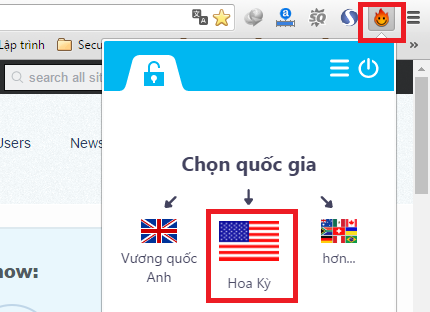
Hola also provides mobile apps for Android and iOS.
Caution: Hola operates on a peer-to-peer bandwidth-sharing network architecture. Joining converts your device into an exit/relay node for other peers.
Avoid using on mobile cellular data to prevent unexpected data consumption.
3. Use Hotspot Shield Free VPN Proxy
If Facebook loading remains slow, install Hotspot Shield extension here. Setup is straightforward.
Toggle connection as shown:
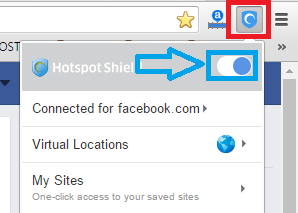
- Mobile Apps: Android, iOS, Windows Phone
Hotspot Shield Free VPN extension provides reliable and fast Facebook speeds among free proxy tools.