CDA (Cellular Digital Accessory), Customization Number, or SI represents software version details and region origin for a mobile phone. The terms CDA, SI, and Customization Number are commonly used on Sony Xperia mobile devices. All three terms carry the exact same meaning.
What Do CDA, SI, and Customization Number Mean on Sony Xperia?
This string of numbers identifies the regional origin of the phone, firmware version info, etc. Firmware builds created for different markets worldwide carry different CDA numbers and change with each new software release.
CDA is used to determine update rollout schedules for new software (firmware) releases on Sony phones.
When a new firmware version is released for a phone model, staggering releases by CDA prevents server overload that would happen if all devices downloaded updates simultaneously.
A concrete example for better understanding:
Here is the interface of software used to retrieve official firmware for Sony Xperia phones:
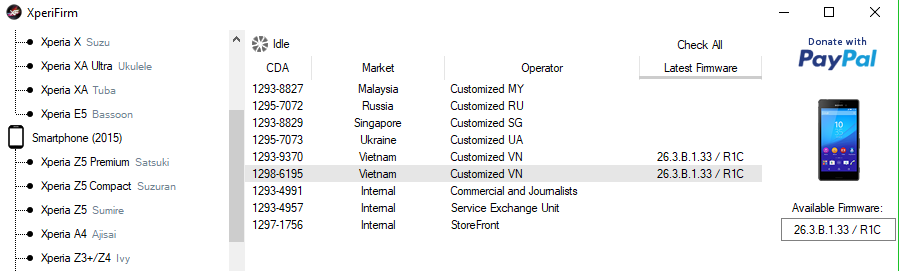
As shown above, these are firmware options for Sony M4 Aqua Dual.
There are 2 builds for Vietnam, sharing the exact same software version number: 26.3.B.1.33/R1C
However, they carry different CDA codes: 1293-9370 and 1298-6195.
Which build should you download?
In reality, both builds are identical apart from the CDA identifier; your phone can run either build without issues.
Why are there 2 builds? Because if there are many M4 Aqua Dual users in Vietnam, when Sony releases a newer Android build, phones with CDA 1293-9370 receive the update notification at a different time from those with CDA 1298-6195. The purpose is to avoid overloading update servers.
Format of CDA, SI, and Customization Number
It consists of a numerical string formatted as follows (X replaces digits):
- XXXX-XXXX
- XXXX-XXXX-RXX
How to Find Your Customization Number
SI: You can find it printed directly on the phone's retail box.
Customization Number: You can view it directly on the phone by following these steps:
- Dial *#*#7378423#*#*
- Select Service Info
- Select Software Info
Locate the string displayed on the Customization Version: line.
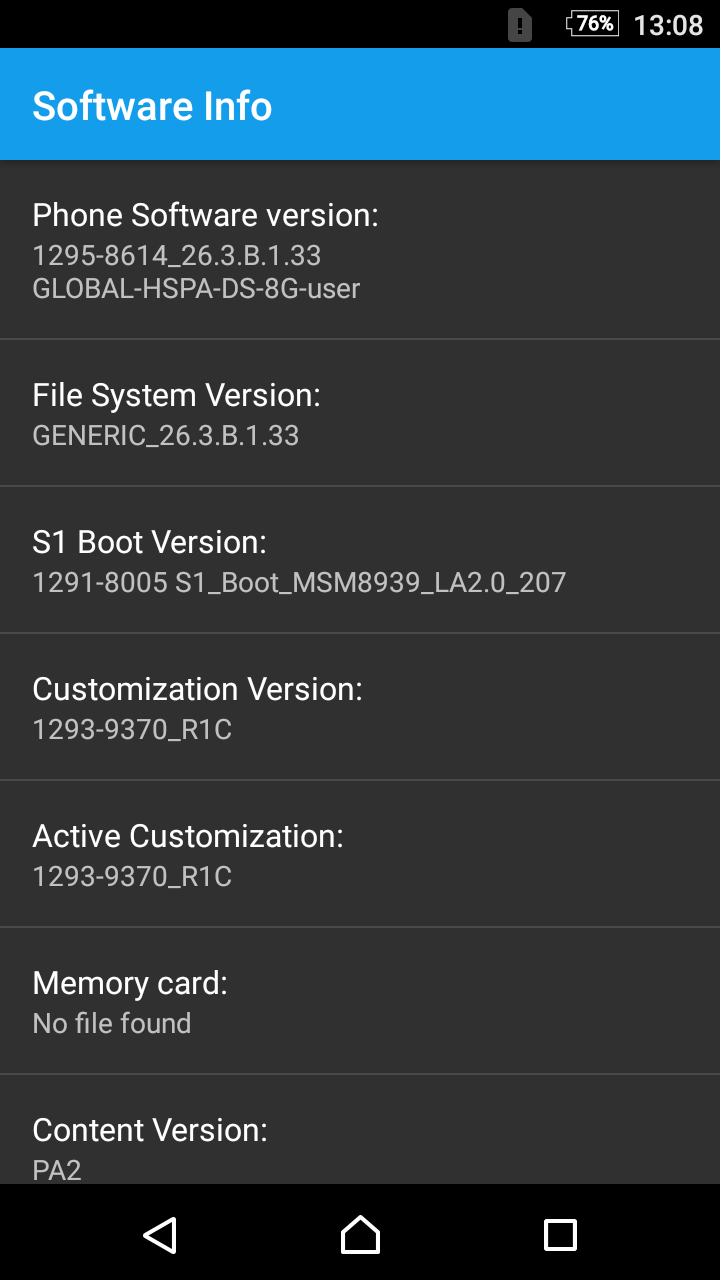
Note: The SI code printed on your phone box might differ from the Customization Version displayed in software if your phone has been updated to a newer Android version.