Browsing through Instagram, you often find beautiful profile pictures of friends. But seeing them in small dimensions isn't satisfying; I tried modifying the image link and succeeded. Here is how to download profile pictures on Instagram in FULL SIZE.
Guide to Downloading Instagram Profile Pictures in FULL SIZE
- Visit the profile page whose picture you want to download, right-click on the avatar, and select Inspect.
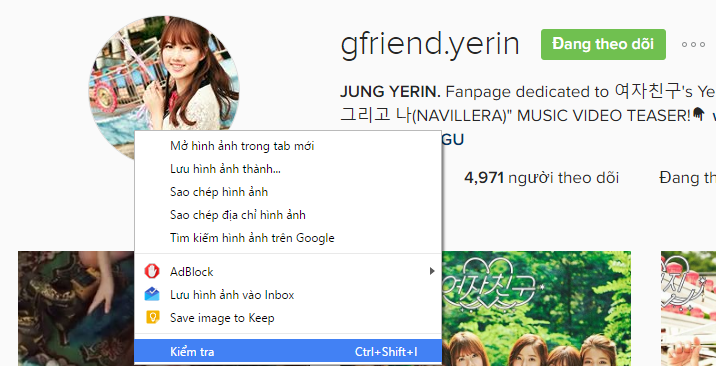
- A panel appears; double-click on the link following
src="and select Copy.
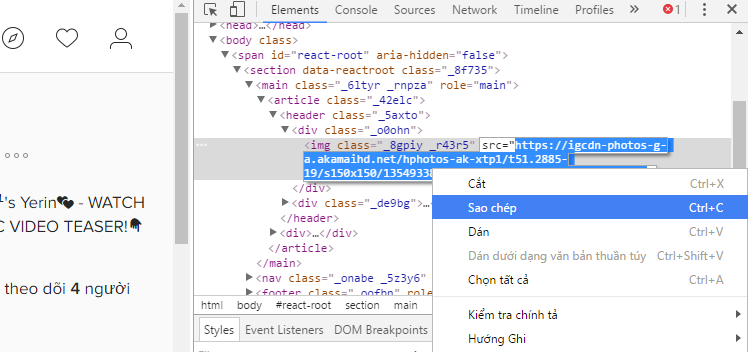
You will get a link like this:
https://igcdn-photos-g-a.akamaihd.net/hphotos-ak-xtp1/t51.2885-19/s150x150/13549338_966247793492846_725150544_a.jpgRemove the string "s150x150/" from the URL above. Paste the remaining link into your browser to view and download the profile picture in its original full size.
Result: igcdn-photos-g-a.akamaihd.net/hphotos-ak-xtp1/t51.2885-19/13549338_966247793492846_725150544_a.jpg
See also: How to get free likes on Instagram